
 Integration guide
Get Chatbot Leads Delivered Straight to Your Inbox
The email integration makes sure no captured lead sits unnoticed in a dashboard. The moment your agent collects a lead's details in conversation, Nexle emails them to your inbox — so you can follow up while the lead is still warm.
Before you startWhat You'll Need
- A Nexle account with a published agent
- The email address where you want lead alerts delivered
Step by stepHow to Set Up Email Lead Notifications
The fastest integration of all — three fields and you're done.
Open Integrations in your Nexle dashboard
Go to your agent, open the Integrations tab, find Email, and click Connect.
Enter the destination email address
Type the inbox where lead alerts should land — yours, your sales team's, or a shared address like leads@yourbusiness.com.
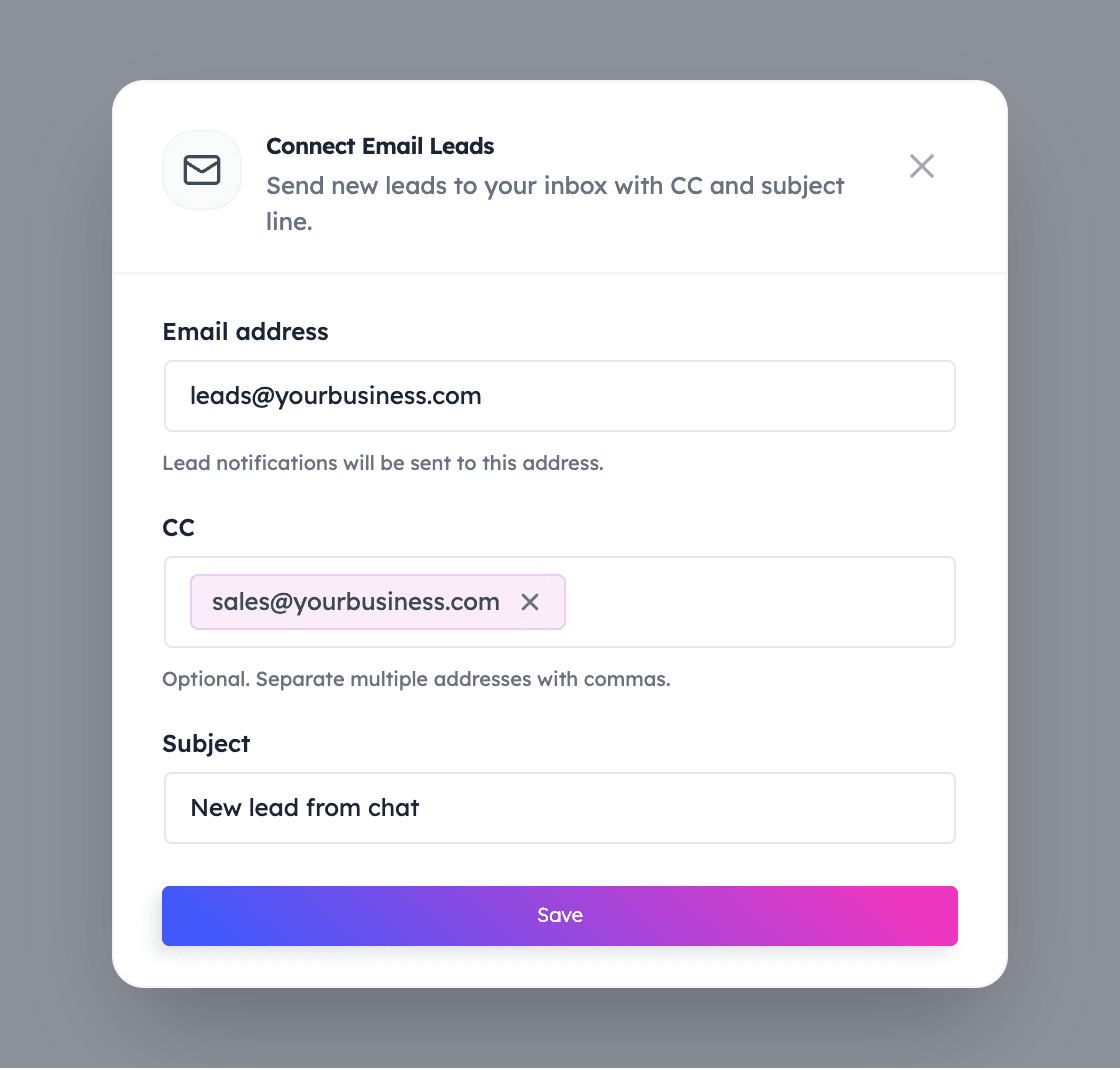
Add CC recipients (optional)
Want a colleague looped in? Add their address in the CC field so everyone sees new leads at the same time.
Set the subject line and save
Give the alerts a recognisable subject — for example, "New lead from chat" — so they're easy to spot and filter. Save, and the integration is live.
Test it
Chat with your agent and leave contact details as a visitor would. The lead's details arrive in your inbox moments later.
No passwords, no SMTP, no mail-server setup
Nexle sends the notifications for you — you only provide the destination address. Nothing to configure in your email provider, and you can change the recipient, CC list, or subject at any time from the dashboard.
Integration FAQsFrequently Asked Questions
Common questions about the Email integration.
What's included in a lead notification email?
The contact details your agent captured in the conversation — so your follow-up starts with everything the lead already shared.
Can lead alerts go to more than one person?
Yes. Use the CC field to add extra recipients, or point the main address at a shared inbox your team watches.
Do I need to give Nexle my email password?
No. Nexle sends notifications to the address you enter — it never asks for your inbox credentials or mail-server settings.
Can I change the recipient later?
Yes. Edit the address, CC list, or subject line in the Email integration at any time.
Does this replace the dashboard's lead list?
No — it complements it. Leads remain in your Nexle dashboard; the email is your real-time alert so nothing waits until you next log in.
Keep connectingExplore More Integrations
Calendly
Turn conversations into confirmed meetings — your agent offers real availability in chat.
WordPress
Add the Nexle chat widget to any WordPress site with our plugin — no code, no theme edits.
Facebook Messenger
Let your agent answer Messenger conversations from your Facebook Page, day and night.
Start Your Free Trial TodayFollow Up While Leads Are Still Warm
Two minutes of setup, and every captured lead lands in your inbox the moment the conversation ends.